
RepoDB Desktop Studio — Early Access is Open
Everything RepoDB can do in code, you can now do with a few clicks. RepoDB Desktop Studio is the visual side of our Productivity Data Platform, and it is opening for early access today. 🚀
📌 At a glance
| What | Details |
|---|---|
| Download | 👉 Early access build (EXE) |
| Early access ends | ⏳ December 15, 2026 |
| Feedback | 💬 Early access discussion |
| First release | 🎯 Alongside RepoDB v2.0, planned for January 1, 2027 |
⚠️ Disclaimer: This is an early access build. Never use it against production databases. As stated in the RepoDB Desktop Studio license, use it only with development, test or sample databases.
🎬 See it in action
- ▶️ RepoDB Desktop Studio First Glance: a walkthrough of the Studio as it stands today.
- 📜 RepoDB Desktop Studio License Term: how the Studio will be licensed.
🧰 What’s inside
Database Management
Work with your database without writing code:
- Browse databases and tables, and run CRUD, batch and bulk operations from the UI.
- Run your own queries, like in SQL Server Management Studio, and preview the SQL and C# behind each action.
- Import and export CSV, JSON and XML, and stream billions of rows to a file with almost no memory use.
- Copy a schema between 18 database providers, then copy the data across.
Insights Management
Monitor the telemetry of your production applications, whether they run on-premise, in the cloud, or in Docker, Podman or Kubernetes. You can drill down from groups to applications, operations and events.
Definition Management
Keep your database schema in a JSON, YAML, XML or CSV file. Edit columns, indexes, constraints and relationships there, then apply it to any supported database. No code-first setup is required.
Styles and themes
Make it your own, with three styles (Classic, Modern and Robotics) and six themes.
⚙️ Configure Insights
Insights needs a small local backend: a collector that receives telemetry, a query API that reads it, and a PostgreSQL database. Docker runs all of them for you in three steps.
Step 1: Start the backend
Download docker-compose.yml and .env into the same folder, anywhere on your machine. Then run:
docker compose up -d
You should see all the containers start:

The containers use ports
5002(collector),5003(query API) and5432(PostgreSQL). Stop anything else that uses them first, such as a local PostgreSQL.
Step 2: Send telemetry to the collector
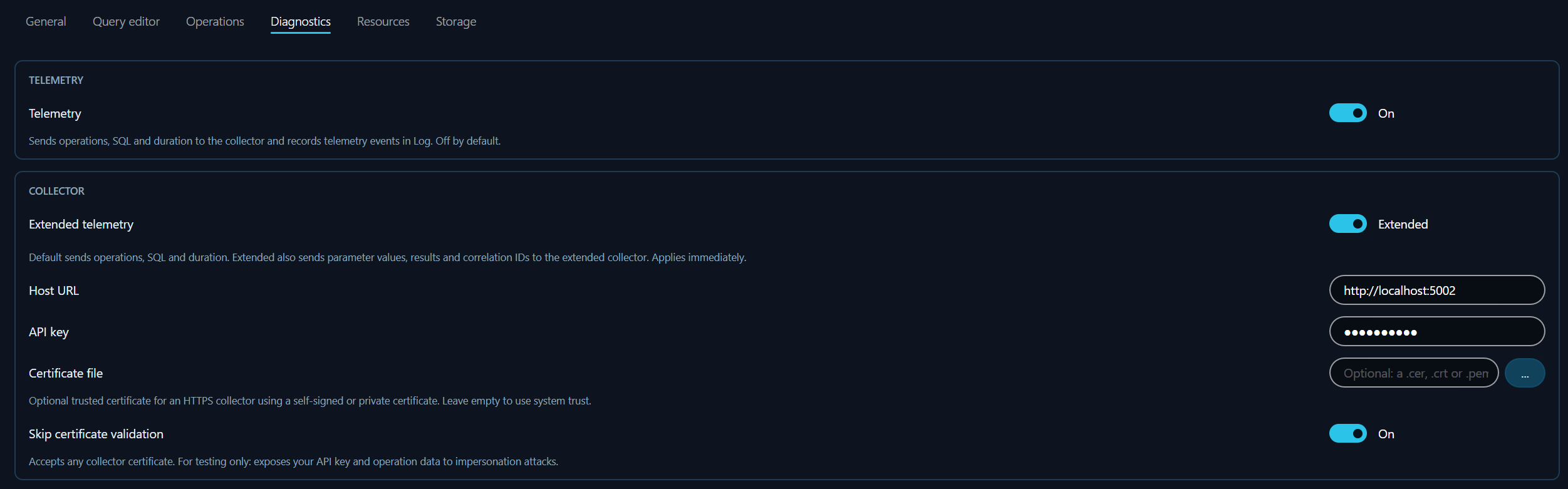
In the Studio, go to Options > Diagnostics and set the following:
| Setting | Value |
|---|---|
| Telemetry | On |
| Extended telemetry | On |
| Host URL | http://localhost:5002 |
| API key | RepoDB2026 |
Step 3: Connect to the query API
Open the Insights module from the left sidebar, then add a connection from Tools > Query API Manager:
| Setting | Value |
|---|---|
| Name | Local Query API (or any name you like) |
| Query API URL | http://localhost:5003 |
| API key | RepoDB2026 |
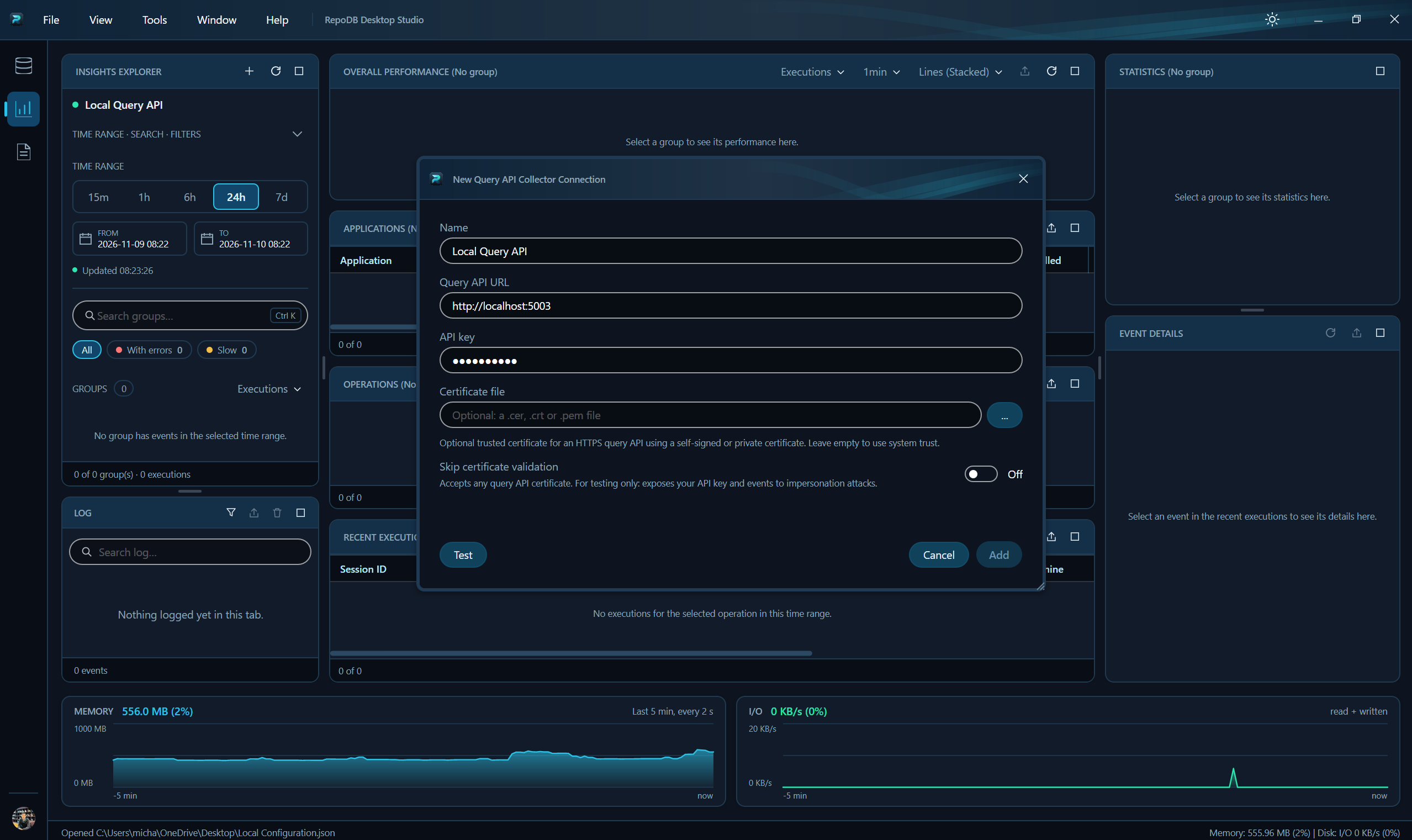
Click Test, then Add, and select your new Query API in the Insights Explorer. Your telemetry appears there as you work.
The API key
RepoDB2026is the default. To change it, editREPODB_API_KEYin.env, rundocker compose up -dagain, and use the new key in steps 2 and 3.
🗄️ Supported databases
The Studio works with every RepoDB provider: SQL Server, PostgreSQL, MySQL, MariaDB, SQLite (Microsoft, Turso and Ahtola), AuroraDB, Oracle, DB2, ClickHouse, Vertica, Firebird, DuckDB, EnterpriseDB and SAP HANA.
Redshift, Snowflake and KingbaseES are next.
🙋 How to join
- Download the EXE from the early access folder.
- Try it on your own non-production databases.
- Tell us what breaks in the early access discussion before December 15, 2026.
💬 The feedback we need
What we need most is feedback: bugs, rough edges, and what slows you down. We already have plenty of ideas, so please focus on how the Studio works for you.
🔭 What’s next
Your feedback shapes the first release, which is planned alongside RepoDB v2.0 on January 1, 2027. Data Engineering, AI Engineering and .NET Notebook modules are planned for 2027.
See you in the discussion! 👋
~ Conceptualized by me. Reviewed and checked by AI. Refined and gatekept by me. ~
Please support us
Give a ⭐ to our GitHub repository |
Follow me on X / Twitter |
Connect with us on our official Teams Channel
Apache License 2.0 — Copyright © 2026 by Michael Camara Pendon / Create a Request